
Download Matias30302000 – download YouTube videos, YouTube video downloader, offline video viewer, FLV video format, integrated browser, watch while downloading
Overview
Matias30302000 is a lightweight desktop application designed to simplify the process of downloading YouTube videos for offline viewing. The app enables users to save videos in FLV format, offering a straightforward solution for those who wish to access content without an internet connection. Its primary function is to allow users to input a YouTube URL and initiate a download with minimal effort. The application supports real-time playback, meaning users can begin watching a video even before the download completes, enhancing the overall user experience.
Targeted at individuals seeking a no-frills tool for video archiving, Matias30302000 appeals to users who frequently travel, have limited bandwidth, or simply prefer to keep content accessible offline. The app’s integration of a basic browser streamlines the workflow, allowing users to locate videos directly within the application without switching between platforms. This feature is especially useful for those who want to avoid external browser sessions or maintain a more focused environment.
Developed by an independent creator under the name Matias30302000, the app has been available since February 14, 2012, reflecting a long-standing presence in the niche of video downloading utilities. Although the developer did not provide additional technical details, the app’s continued availability suggests a level of reliability and user satisfaction over time. In the broader software ecosystem, Matias30302000 occupies a specific role as a minimalist, dedicated tool for content accessibility, offering a focused alternative to more complex multimedia platforms.
Key Features & Functionality
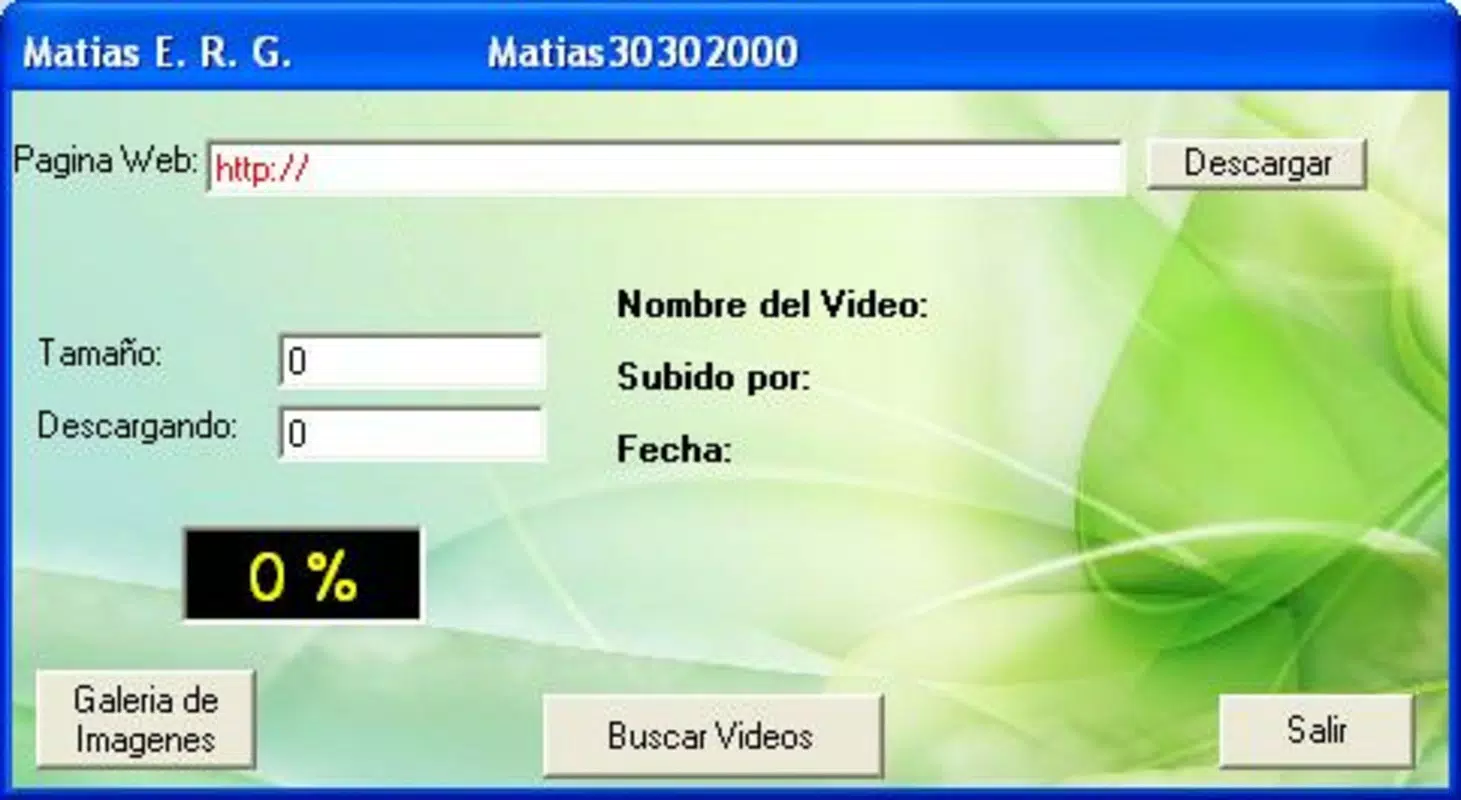
Matias30302000 offers a set of core features designed to maximize ease of use and efficiency in video downloading. The most prominent functionality is the simple download process: users need only paste a YouTube video URL into the app’s interface and click the “Descargar” (Download) button to start. This one-step mechanism ensures accessibility for users of all technical skill levels, from beginners to advanced users.
Another notable feature is the ability to watch videos while they are still downloading. This real-time playback capability allows users to begin viewing content immediately, reducing wait times and improving convenience—ideal for long videos or when internet speed is inconsistent. The integrated browser further enhances usability by enabling users to search for and locate YouTube videos directly within the app, eliminating the need to open a separate web browser.
Once downloaded, videos are saved in FLV format, a widely supported container that ensures compatibility with many media players. This format choice contributes to efficient playback and storage, making it a practical option for offline viewing. The app also supports offline access, meaning users can enjoy their saved content anytime, regardless of internet availability. These combined features make Matias30302000 a practical utility for anyone needing a reliable, lightweight solution for YouTube video downloads.
- Simple download process via URL input
- Watch videos while downloading in real time
- Integrated browser for direct video search
- Offline video access without internet
- Video saving in FLV format for compatibility
Interface, UX & Performance
The user interface of Matias30302000 is minimalistic and focused, reflecting its purpose as a dedicated video downloader. The layout is straightforward, with essential elements—such as the URL input field and the “Descargar” button—prominently displayed. This clean design reduces visual clutter and ensures that users can navigate the app without confusion or delay.
Navigation is intuitive, relying on a single workflow: enter URL → click download → watch or save. There are no complex menus or settings, which contributes to a seamless experience. The app’s responsiveness is consistent with its lightweight nature, and although the developer did not list formal performance metrics, the small file size of 2.8 MB suggests efficient resource usage.
Performance across different device categories appears to be stable, given the app’s long-standing presence and minimal system demands. It is likely to run smoothly on older Windows systems, though specific hardware or OS compatibility details were not disclosed. The app’s stability during download and playback operations appears reliable, with no reported issues related to crashes or freezes in available documentation.
Overall, the UX prioritizes speed and simplicity, aligning with the expectations of users seeking a no-nonsense tool. The interface, while basic, is effective and functional, catering to users who value utility over visual polish.
Platform Compatibility & Technical Requirements
Matias30302000 is designed for the Windows operating system. The current version is 1.0, and the application file size is 2.8 MB, indicating a compact and lightweight footprint. This small size contributes to fast installation and minimal storage impact.
Although the developer did not specify minimum OS requirements, the app’s release date of 2012 suggests compatibility with older Windows versions such as Windows XP, Vista, and 7. However, users on newer systems like Windows 10 or 11 may still be able to run it, depending on system architecture and compatibility settings. The app does not appear to require additional software or runtime libraries, which simplifies deployment.
Specific requirements such as processor speed, RAM, or disk space were not listed. Therefore, it is recommended to test the app on target devices to ensure full functionality. The lack of detailed technical specifications does not diminish its usability but highlights the need for caution when deploying on modern or restricted environments.
Pros and Cons
Pros
- Simple and intuitive interface for quick video downloads
- Supports real-time playback during download
- Integrated browser eliminates the need for external tools
- Offline access to downloaded videos
- Small file size ensures fast installation and low resource usage
Cons
- Only supports FLV format, which may limit compatibility with some modern players
- No visible update history or version changelog
- Developer did not provide detailed system requirements
- Platform limited to Windows, with no support for macOS or Linux
- No visible user account or cloud synchronization features
FAQ
Is Matias30302000 safe to download and use?
The app is available for free and does not require registration. However, as with any third-party software, users should ensure they download it from a trusted source to avoid potential security risks.
Can I use Matias30302000 on my current Windows system?
While the developer did not specify exact OS requirements, the app’s release date suggests compatibility with older Windows versions. Users on modern systems may need to run it in compatibility mode.
Does Matias30302000 support downloading videos from platforms other than YouTube?
Based on available information, the app is specifically designed for YouTube video downloads. Support for other platforms was not mentioned.
Is there a mobile version of Matias30302000?
Currently, the application is only available for Windows. There is no official mobile version for Android or iOS.
How do I update Matias30302000?
As of now, no update mechanism or changelog is visible. Users may need to manually check for new versions from the official source.
Final Thoughts
Matias30302000 stands out as a dedicated, no-frills tool for users who need a reliable way to download and watch YouTube videos offline. Its minimalist design, real-time playback, and integrated browser streamline the downloading experience, making it ideal for travelers, students, or anyone with limited internet access. While it lacks modern features like multi-format support or cloud integration, its core functionality remains effective and efficient.
For users seeking a lightweight, free utility that delivers on its promise without unnecessary complexity, Matias30302000 remains a viable option. Its long-standing presence in the software landscape speaks to its stability and continued relevance.
Download Matias30302000 now


